


You can download our blank free weekly rota template for Excel to print right now. It covers seven days for up to ten people, and works out total hours and labour costs on its own. Below, you will find worked examples of all three formats, what each one is actually good for, and the working time rules your rota has to respect before you publish it.
What should a rota template include?
A usable rota template needs six things. Anything less and you will end up answering the same questions on WhatsApp all week.
- Names, not job titles. Your team needs to find themselves in two seconds.
- Start and finish times, not "AM" or "PM". Vague shifts create arguments.
- Total hours per person. Without this you cannot see who is drifting over their contracted hours or under them.
- Total hours and headcount per day. This is how you spot a Thursday with one person on and a Saturday with five.
- Roles or positions against each shift. Two people on shift is useless if neither can open the till.
- Labour cost. The National Living Wage is £12.71 an hour for workers aged 21 and over from April 2026. The National Minimum Wage is £10.85 for 18 to 20 year olds and £8.00 for 16 to 17 year olds and eligible apprentices. A rota that does not show cost is a rota that surprises you at payroll.
Everything else is decoration.
The weekly staff rota template: an example for shifts that change every week
This is the format most UK SMBs need. Shifts change, people swap, someone calls in sick on a Tuesday. A weekly grid with exact times handles all of it.
Here is a week for a four-person team, week commencing Monday 7 September 2026, with a 30 minute unpaid break on any shift over six hours:
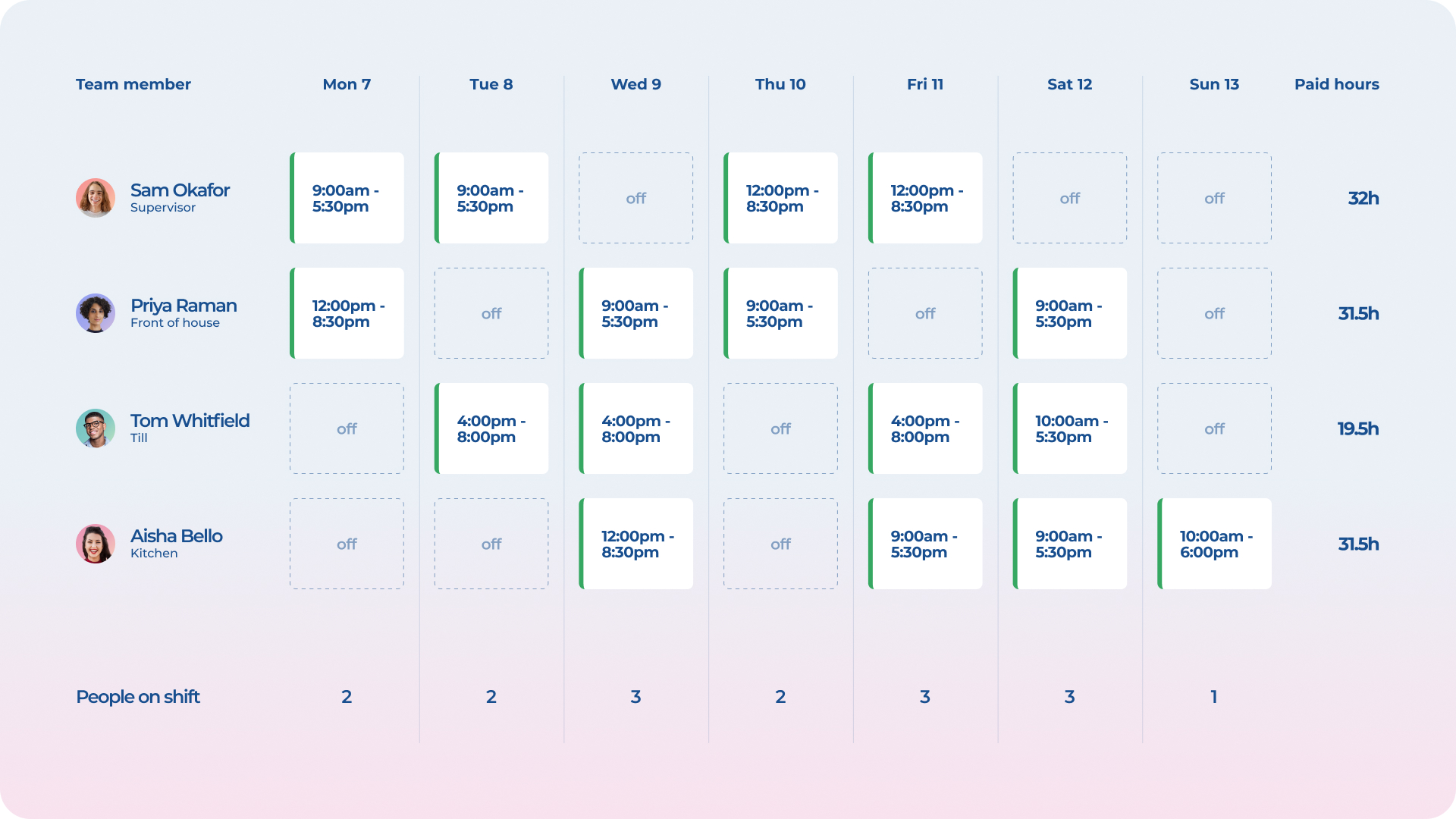
Notice what the bottom rows tell you. Sunday has one person on and £95 of labour, Saturday has three and £292.
The fortnightly rota template: for rolling patterns
If your team works a rolling pattern, a weekly template makes you retype the same thing twice. A fortnightly grid holds the whole cycle in one view.
Two weeks of an alternating early and late pattern, where early is 06:00 to 14:00 and late is 14:00 to 22:00, both with a 30 minute unpaid break:
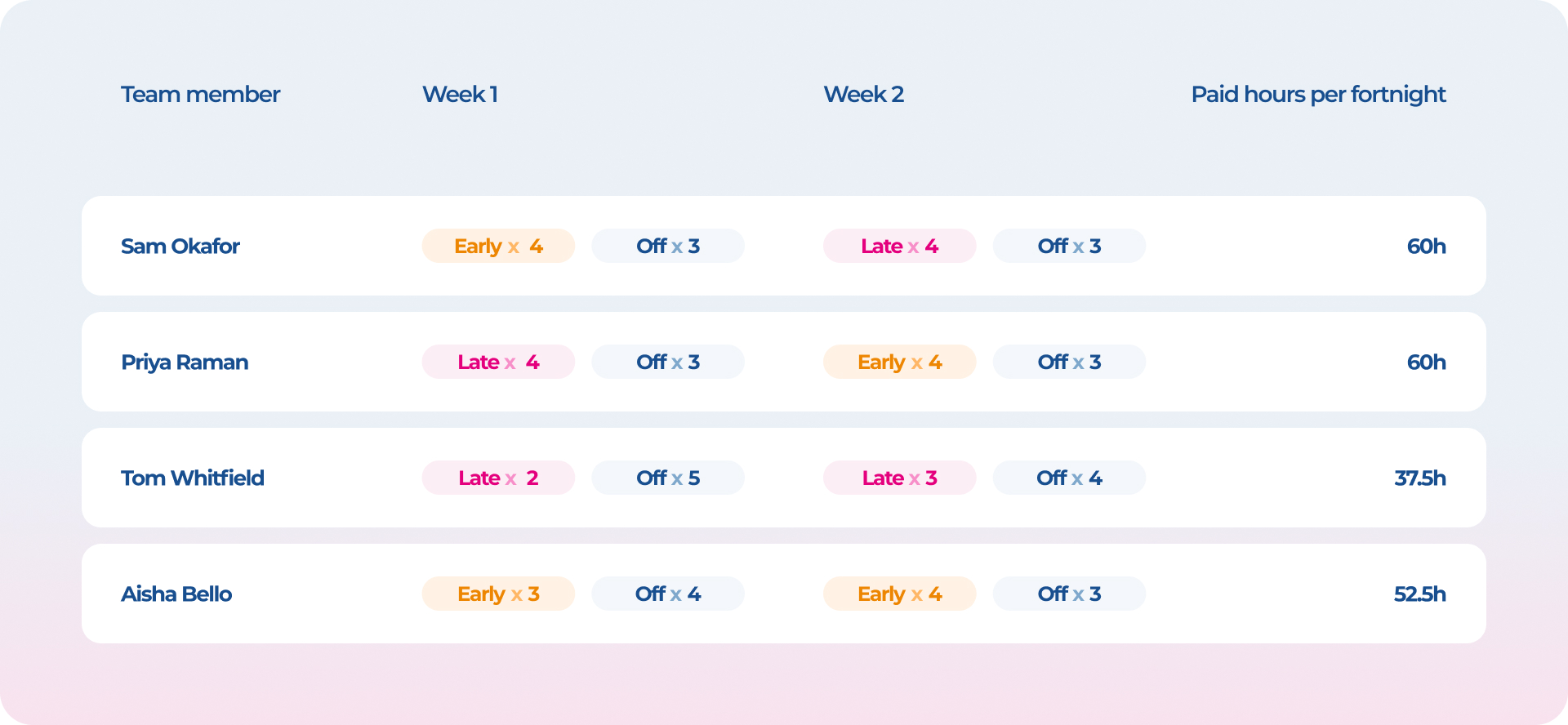
The real advantage is not tidiness. It is that the fortnight is the unit the law tends to care about. Weekly rest can be given as 24 uninterrupted hours every seven days or 48 hours every fortnight, so a two-week view is where you can actually prove you have given it.
The monthly rota template: for fixed cycles
Once your pattern is genuinely fixed, typing start and finish times into 31 columns is a faff. Monthly rotas use shift codes instead: one letter per day, with the times defined once in a key.
And here is how the first eight days of September 2026 look on a four on, four off pattern:
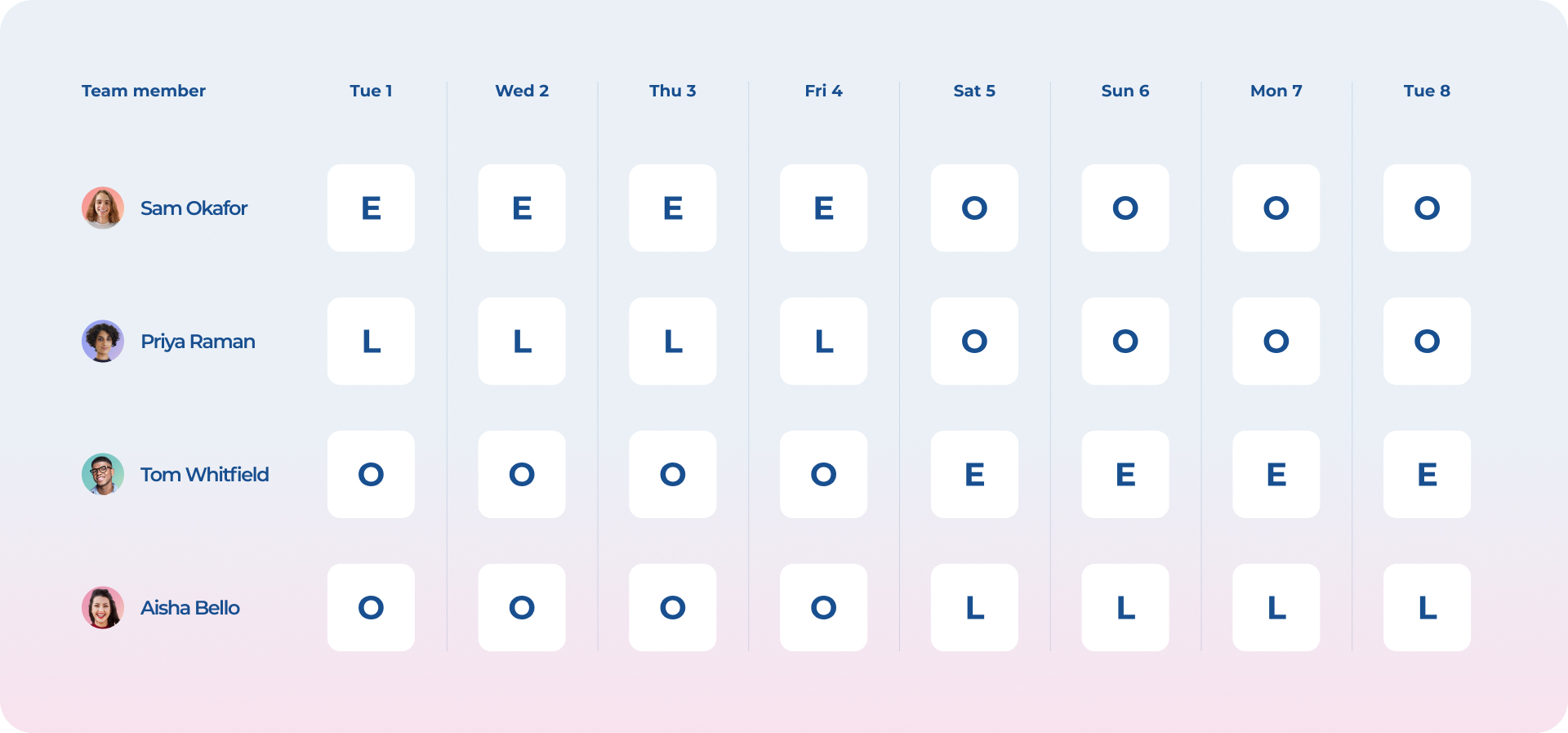
Codes make a month readable at a glance. They also make it much easier to see a problem: for example, an L followed by an E would mean someone finishes at 22:00 and starts at 06:00, which is eight hours' rest. That is a breach, and it is harder to catch on a weekly sheet.
Which rota template should you actually use?
Most teams end up with a weekly template. If you are rebuilding the identical grid every Sunday evening, you have outgrown it. If you are new to this, our guide on how to create a work rota walks through the order to do things in.
What about Holiday and Christmas rota?
A holiday rota is the same grid with one extra job: nobody gets rostered on a day they have booked off. Mark annual leave with its own code (H in our monthly key) before you add a single shift, then build around the gaps. Bank holidays need the same treatment, plus a decision on who worked the last one, so Christmas cover rotates instead of landing on the same two people every year. legal, but it should make breaches visible before you publish. Four rules do most of the work. Might as well try our Holiday Calculator that can also do UK specific accrual math for you, since you're here.
Does a rota template need to account for working time rules?
Yes. A template does not make a rota legal, but it should make breaches visible before you publish. Four rules do most of the work.
The 48-hour average. Most workers cannot average more than 48 hours a week over a 17-week reference period unless they have opted out in writing. A single busy week is not a breach. A pattern of them is.
Eleven hours between shifts. Workers are entitled to at least 11 consecutive hours' rest between finishing one shift and starting the next. They also need 24 uninterrupted hours off every seven days, or 48 hours every 14 days, and a 20 minute uninterrupted break on any day they work more than six hours (ACAS).
What the contract already says. The written statement you give every employee and worker on day one has to set out their working hours, which days they are required to work, and if and how those can change. A rota that routinely contradicts the contract is a problem your template cannot fix.
Records. You are expected to keep records showing 48-hour compliance for two years. A rota is a plan. A staff timesheet template is the record.
Why your rota is about to matter more
Rota notice is no longer just a courtesy. 2022 research from the Living Wage Foundation found that among UK workers with variable hours or shift work, over half (55%) get less than a week's notice of their schedules (Living Wage Foundation).
The government is doing something about it. The Employment Rights Act 2025 contains three new rights for qualifying workers on zero and low hours contracts: a right to be offered guaranteed hours, a right to reasonable notice of shifts, and a right to payment when a shift is cancelled, moved or cut at short notice. Those measures are expected to come into force in 2027, and the consultation setting out the details closed on 25 August 2026, with the rules to follow in regulations.
Here's the thing: when "reasonable notice" gets a number attached to it, the businesses that will struggle are the ones building next week's rota on Sunday night. Publishing further ahead is the change, and a template that holds a fortnight or a month is how you get there.
When does a spreadsheet stop being enough?
An Excel rota template is genuinely the right tool for a lot of teams. It is free, everyone can open it, and it does not need a decision from anyone.
It starts to hurt at a predictable point:
- You are emailing the file, and three people are working from last week's version.
- Someone swaps a shift and nobody updates the sheet.
- You are cross-referencing the rota against a separate holiday spreadsheet to check who is even available.
- You have no idea whether the hours on the rota match the hours people actually worked.
That last one is the expensive one. If you have reached it, our comparison of the best shift rota apps for UK teams covers the options honestly, including the ones that suit your sector better than we do.
Timetastic Rota & Time Clock is the newest part of Timetastic. It adds rota building, a time clock and timesheets on top of the leave data you already have, so the rota knows who is off before you publish it. Your team gets the shift on their phone, clocks in from it, and the hours land on a timesheet ready for payroll.
Start your free 30-day trial, no credit card required.
FAQ
Can I change a rota after I have published it?
Usually yes, but check the contract first. The written statement sets out whether hours and days can vary and how, so if it says the rota is fixed you cannot simply move a shift. Changing published shifts repeatedly at short notice is also the practice the Employment Rights Act 2025 is aimed at.
Do rota templates work for zero-hours and part-time staff?
Yes, and the total hours column matters more for them, not less. It is how you check that someone contracted for 16 hours is not quietly working 30 every week, which affects holiday pay calculations and, in future, their right to be offered guaranteed hours.
How many people can a spreadsheet rota realistically handle?
In our experience, around ten to fifteen before it becomes unmanageable. The limit is not the spreadsheet, it is version control: the more people who need to see the file and act on it, the more likely someone works from an out-of-date copy.
Should the rota show unpaid breaks?
Yes, otherwise your hours and your labour costs are both wrong. Record the break length against each shift so paid hours are calculated after it, and so you can show that anyone working over six hours got their 20 minutes.
How much notice should you give staff of their rota in the UK?
There is no general rule requiring a rota to be published a set time in advance at the moment, but the working hours and days in the written statement are a legal requirement, and reasonable notice of shifts is coming for qualifying workers under the Employment Rights Act 2025. This also answers the "Do I have to give my team a written rota" - question.
What is a 4 on 4 off rota?
Four consecutive shifts followed by four days off, repeating. It gives 24/7 cover with two crews, and it is easiest to manage on a monthly template with shift codes, like the September example above.



200,000+ people book their time off here
Set it up for your team before the next request lands.